When you store objects in AWS S3, you are not only paying for the stored object, but you generally also access those objects in some way.
If your AWS account is relatively new (less than 12 months old), you will probably be able to benefit from the free tier. That means 5 GB of free storage + 20,000 GET requests and 2,000 PUT requests. Remember that this offer expires 12 months after the account is created.
Table of contents
- 3 items in our bill to reduce your AWS S3 bill: storage, requests and data transfer
- How can I measure in real time how much AWS S3 I am using?
We have 3 items in our bill to reduce your AWS S3 bill: storage, requests and data transfer
Depending on the type of storage you choose for your Bucket, that is the price you pay per GB of data stored. You have 3 types, Standard, Standard-IA (infrequent access) and Glacier and the price varies according to the region where your bucket is created.
This is essentially the number of calls made to the S3 API to retrieve the objects. The price depends on the type of request (DELETE requests are free), on the region and on the storage type.
You might also see things like this on your bill:
- Amazon Simple Storage Service EU-Requests-Tier1: These are the PUT, COPY, POST or LIST requests.
- Amazon Simple Storage Service EU-Requests-Tier2: This is for GET requests and all the other requests.
- Amazon Simple Storage Service EU-Requests-Tier3 : These are the requests relating to Glacier.
- Amazon Simple Storage Service EU-Requests-Tier4: This is the number of transitions to standard infrequent access that you have requested.
This is measured inbound (IN) and outbound (OUT). The good thing is that IN data is free. OUT transfer depends on where and how you send the data. If you transfer data to another EC2 instance in the same region, it is free. Remember to use S3 VPC endpoints to save even more money.
You have the price list on the Amazon S3 site here, be careful, it changes very often.
Now, how can I measure in real time how much AWS S3 I am using?
With the new S3 management console (you have to enable it in your AWS account), you have the list of buckets.
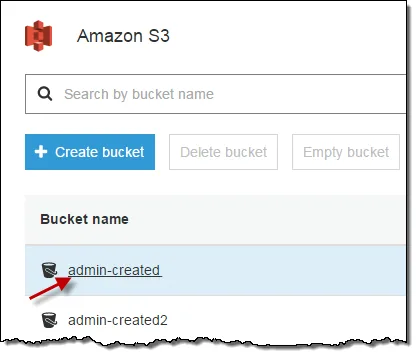
When you select one of them,
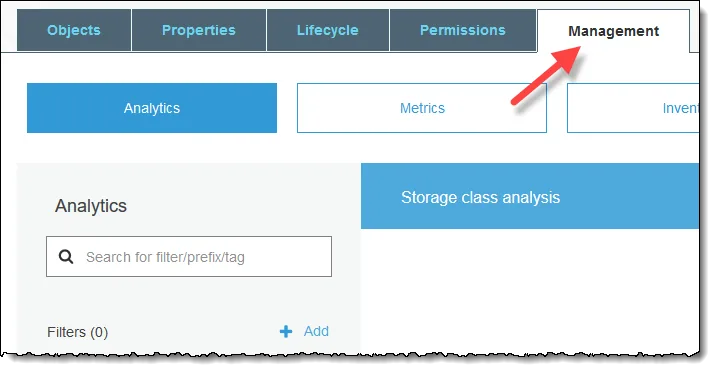
Choose the Management tab at the top of the page.
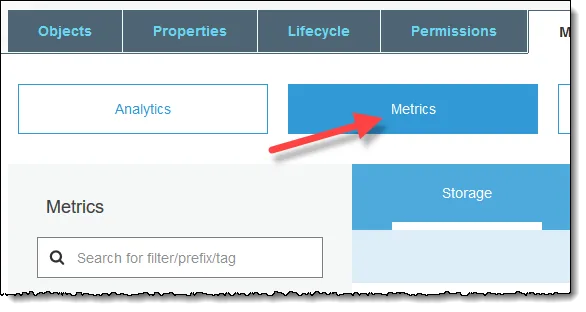
Then choose Metrics
Here you will be able to choose between Storage, Requests or Data Transfer.
It should be pointed out that the storage metric is the only one that is Free.
I strongly recommend keeping an eye on your AWS bills and analysing this one with the Cost Explorer tool, you will find many ways to save money and to earn your boss’s congratulations 😉!
Do not hesitate to contact us for more advice!