
That’s it, it’s official: it will be at least 5 weeks of lockdown. More than 1 person in 3 has to, or will have to, work remotely to keep their business running. Some companies are very resistant to remote working in normal times, but exceptional situations sometimes call for a change that can be abrupt.
Within our company, we have been used to working as a team and remotely for several years. We are spread across several sites and we have to make sure that things run smoothly in all circumstances.
We work remotely when it is possible and relevant, and we hold remote meetings every day. Our core business is cloud consulting and development, so inevitably, for us online work is an integral part of our DNA.
Building on this long-running experience, we have put in place good practices that keep evolving. We have also looked for, discovered, tested and adapted tools, and adjusted our methods. The watchwords are flexibility, autonomy, efficiency and connection !! HUMAN !!
Talking with our professional and personal contacts over the past few weeks, we realise that remote working is far from being the norm, and that working from home for an indefinite period is a real challenge for many people.
Today’s crisis situation is different from anything we have known before, and the Anglo-Saxon “business as usual” model is becoming impossible.
And precisely, would this not be the right moment to take the step back we need and learn to work together differently? That is how the idea for this article took shape. Many articles and methods, more or less humorous, have sprung up on the net, and here is our own small contribution. What are the right tools, the right reflexes to have? How can we work differently while gaining in efficiency? How can we make the best use of our time during this improbable interlude?
The list below is not meant to be right or exhaustive; it tries to share our experience and to help others, if that is possible, suffer less from this situation. To some, it will perhaps seem simple, obvious. In that case, we invite them to share their tools or methods to enrich this list through the comments on social media.
We are aware that many jobs cannot be done remotely, or only with difficulty on an exclusive basis. Perhaps this crisis is affecting your colleagues, clients, suppliers, staff or yourself. We are all affected in one way or another. There may be technological barriers, such as not being equipped with the right hardware and/or the right software (VPN, file sharing). Let us focus here on the solutions, and if you run into obstacles, we will be glad to discuss them with you and see how to find alternatives. For that, mutual support is the key.
Table of contents
- Lockdown can be the opportunity to organise ourselves better internally!
- Connection: the art of the effective meeting (in person or online!)
- Flexibility and autonomy: the art of organisation.
- LEARNING: Staying motivated by using lockdown to train
- COMMUNICATION: the tool of nonviolent communication
- HAVING THE RIGHT TOOLS – the other tools we use and recommend
Lockdown can be the opportunity to organise ourselves better internally!
- CONNECTION: Keep the link alive: hold “team” check-ins and smaller-group ones. see effective meetings in person or online here and the tools for that.
- FLEXIBILITY and AUTONOMY : Be flexible with working hours and understand everyone’s professional and personal constraints. The key: be accountable and transparent.
- LEARNING : Use this time to train.
- COMMUNICATION : Develop your ability to communicate better as a team : learn to put your fears and your expectations into words and to understand the other person better. It also works for any other situation in life.
- HAVING THE RIGHT TOOLS: the tools we use for communication, organisation, HR, insurance and banking that make our lives easier and allow autonomous, online management..
Connection: the art of the effective meeting (in person or online!)
We have all been through that improbably long meeting with no purpose and no end, where we would rather have been anywhere else. A few tips for an effective meeting (online or not):
- Have an agenda and documents that people have read before the meeting. Holding a meeting: is it the best solution? If we go beyond the objectives of the initial meeting, set another time to discuss side topics, possibly in a smaller group. (see next point)
- Have the right people around the table (even a virtual one)
- A set time and we stick to it, we start on time, we finish on time
- Someone takes notes (ideally not always the same person)
- Write up the actions during the meeting – tasks, who is responsible/involved, what the deadline is.
- Time for everyone. If we are on a substantive topic, a good practice is to give everyone time to prepare and to speak on the subject without being interrupted, and to be able to set out their point of view.
and for an online meeting?
Well, the same principles apply, with a few “technical” differences.
- turn the video on every time. Sometimes we even end up forgetting that we are not in the same room!
- Mute your microphone when you are not speaking, especially if you are in a noisy environment. Do not hesitate to use gestures (long live video) when you want to get something across
- Avoid changing backgrounds and do not sit directly in front of a light source
- Use instant messaging, “chat”/”IM” etc.. and screen sharing when it is needed
- Avoid having several people in the same room on the same video conference.
- If your internet is struggling, favour sound over picture and turn the video off.
Tools for online meetings
- Skype: the upside: it is already the tool many people have on their machine
- Zoom – works remarkably well
- Amazon Chime
- Whereby
- Jitsi (open source)
- Livestorm
- Gotomeeting
- 8×8
Flexibility and autonomy: the art of organisation.
Here, what matters is to focus on what has to be done and not on how or when it has to be done. With lockdown, it is about having a professional life and a personal life at the same time while staying sane.
So the key is to have some tolerance for real-life situations, such as children coming past during the meeting. or organising yourself so you can join the lunchtime online sports class!! 🙂
Organisation tools: Asana – Trello – Jira
Several of them can be used in the same way; we opted for ASANA .
How we use ASANA
We have superb experts on the subject who have developed an art of living around asana. Here are the few principles we all commit to respecting internally:
How do we do it?
Start-of-week sprint, end-of-week sprint.
A few rules:
- A task must never be longer than 4h; if it is longer, it has to be broken down
- Only the right people on the tasks
- Estimate the time to completion in our tasks? realistic deadlines
- Organisation and breakdown into projects
- If there is a question, or a resource, everything must be in the task, not by email.
- Give ourselves time to set the system up and to run cyclical reviews
Advantages
- No more internal emails, or almost none (and if we do receive any, they become a task)
- Identification of blocking points: we move forward, and if we do not, we know why!
- A quick contact point between teams
- Personal and collective visibility of the work done and to be done, with a priority level.
LEARNING: Staying motivated by using lockdown to train
A few MOOC platforms we recommend:
- Coursera
- EdX
- OpenClassRoom
- CloudGuru, Udemy
- and of course the free training from cloud providers such as AWS or Azure.
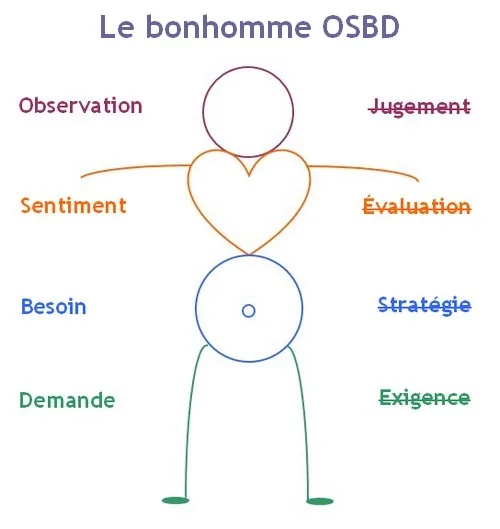
A short summary grid of nonviolent communication for communicating well.
To find out more about NVC, Marshall B Rosenberg, “Les mots sont des fenêtres ou bien ils sont des murs, Initiation à la communication non Violente”
- Sales functions: Pipedrive, salesforce
The database is the basis of it all!
A few tips:
- Have a naming convention and stick to it / write a charter, even a short one, for a common reference framework
- Keep the information up to date. It may sound simple, yet it is the hardest thing to do. Maintaining a database over time.
- Everyone has to pitch in and must collect and enrich the data.
- Comply with the GDPR – Know and understand the legal framework
- HR functions
Move to managed tools – HR/insurance management Payfit /Alan and Qonto
Advantages:
- online and almost automated management, paperless documents and payslips
- autonomy for employees over their expense claims,
- leave requests
- centralised simplification of requests
- effective reminders, centralisation of information and compatibility between platforms
- Financial management / online banking made especially for companies: N26, Qonto
- Transparency and security
- Simple to use interfaces
Other tools:
- Collaboration:
- Klaxoon, teams
File transfer:
Wetransfer, Smash
Productivity:
Evernote, Tableau software, productivité.so, shift
And above all #RESTEZCHEZVOUS and take care of yourselves and of those close to you