
Moving all or part of your infrastructure to the AWS Cloud has a cost. But it is possible to optimise that spend. The ideal solution: a FinOps approach. This process is now appearing in large groups. It aims to bring finance and engineering closer together. By combining their skills, its teams look at your infrastructure with fresh eyes, with the objective of a FinOps approach to improve your use of the Cloud and considerably reduce your bill.
On AWS, there are 5 main pillars, or tips, for optimising costs. If you want to install your applications with this Cloud Provider, we invite you to follow these 5 recommendations. That way you will build FinOps into your digital strategy.
Table of contents
- FinOps #1: Configure the size of your instances effectively
- FinOps #2: Opt for elasticity
- FinOps #3: Use the right pricing model
- FinOps #4: Optimise your storage
- FinOps #5: Measure and monitor your environments
On AWS, you can adjust the size of the services you use according to your needs at any given moment, and resize them as you go depending on the load peaks recorded. This adjustment depends on several factors: your environment (development, test or production), the fluctuation of your online activity, etc…
Getting the size of your instances right has an impact on the compute capacity of your infrastructure, on its memory, its storage, network throughput…
For this, three managed services are available to you on AWS:
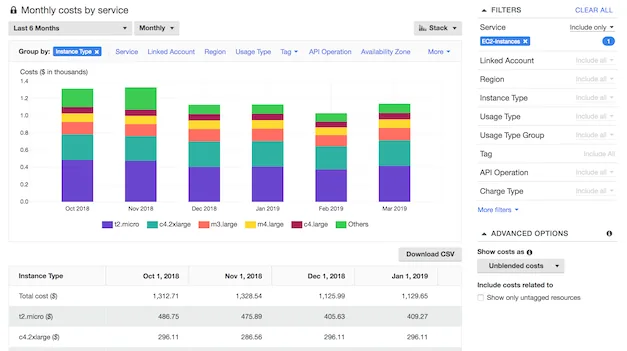
- AWS Cost Explorer lets you probe the cost and usage of Amazon Elastic Compute Cloud (Amazon EC2) instances over the last 13 months.
- AWS Trusted Advisor provides you with real-time information on service usage.
- EC2 Right Sizing analyses two weeks of usage data and gives you detailed recommendations on correctly sizing your Amazon EC2 instances.
FinOps #2: Opt for elasticity
The benefit of FinOps in the Cloud is that you can scale the resources you need up or down according to your requirements. If traffic increases, you will have to use more resources. Once that peak has passed, there is no point keeping that configuration.
Objective: only pay for what you consume.
There are two types of elasticity: the first based on time, the second calculated on the volume of resources needed for proper operation. On AWS, several managed services help you configure these elasticities:
- Amazon EC2 Scheduler lets you configure the start and stop schedule of Amazon EC2 instances.
- AWS Lambda runs your code only when it is needed and adapts automatically, whether that is a few requests a day or thousands per second.
- AWS DataPipeline stops and starts Amazon EC2 instances by running (AWS) CLI commands on a fixed schedule.
- Amazon CloudWatch monitors your use of Amazon EC2 instances and stops them if they are not being used.
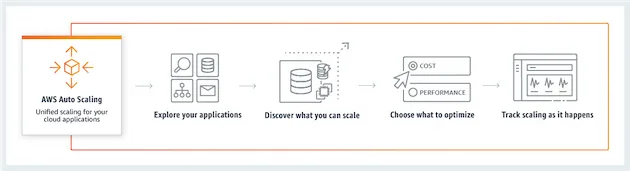
- AWS Auto Scaling automatically increases and reduces the number of your Amazon EC2 instances in order to maintain system performance during traffic peaks and to reduce capacity during quiet periods.
FinOps #3: Use the right pricing model
AWS offers four pricing models: on-demand instances, reserved instances, spot instances and Savings Plans. Combining these four models will let you reduce costs.
With on-demand instances, you pay for compute capacity by the hour or by the second (60 seconds minimum) with no long-term commitment.
With reserved instances, you get a substantial discount (up to 75%) compared with on-demand pricing. You also get a capacity reservation when they run in a specific availability zone.
With Amazon EC2 Spot instances, you take advantage of unused EC2 capacity in the AWS Cloud. These instances are available with a discount of up to 90% compared with on-demand rates. They can be used for static, fault-tolerant or flexible applications such as, for example, test and development workloads.
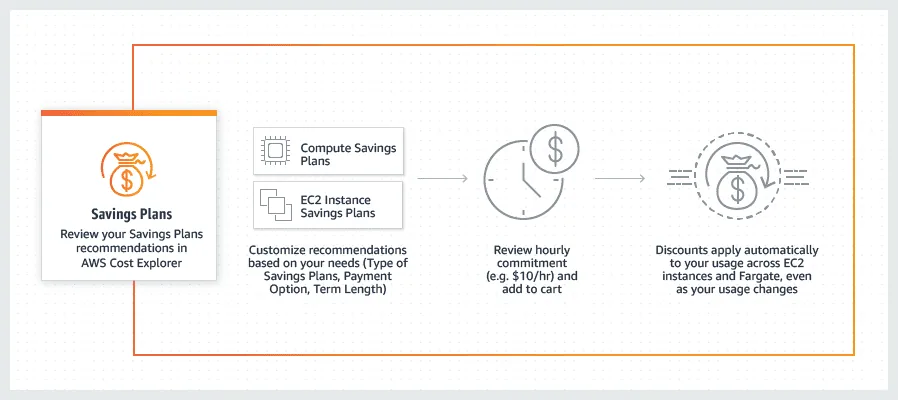
Launched in November 2019, Savings Plans offer the same discounts as reserved instances, but to get access to them the user has to commit to using a specific amount of compute power (measured in dollars per hour) over a period of up to three years.
This model is attractive for companies that have a view of their long-term needs. It will allow them to reserve the resources they need over a long, well-defined period while making savings.
This FinOps Savings Plans comes in two versions:
The “Compute Savings” plan offers great flexibility and lets you cut your costs by up to 66% (just like convertible reserved instances). This plan applies automatically to any EC2 instance, whatever the region. For example, you can move from C4 to C5 instances, or move a workload from Dublin to London, while benefiting from the prices of this savings plan.
By contrast, the EC2 Savings Plans applies to a specific instance family in a single region but offers the largest discount (up to 72%).
To go further on Savings Plans: https://aws.amazon.com/fr/savingsplans/
FinOps #4: Optimise your storage
AWS offers several storage services. The key to securing your FinOps budget on this front is to choose your storage carefully according to your usage.
With Amazon S3, you have a broad storage offering designed for different types of use:
- S3 Standard is dedicated to storing “general purpose” data.
- Conversely, Reduced Redundancy Storage (RRS) lets you store non-critical, reproducible data at lower redundancy levels than Amazon S3 standard storage.
- S3 Intelligent-Tiering moves data between two access tiers (frequent and infrequent). Ideal for data whose access patterns are unknown or changing.
- S3 Standard-Infrequent Access (S3 Standard-IA) is intended for data that is rarely accessed (secondary backup copy of a site’s data, etc…)
- Amazon S3 Glacier (S3 Glacier) and Amazon S3 Glacier Deep Archive (S3 Glacier Deep Archive) are storage classes intended for long-term data archiving and backup. Both offer cost-effective archive access options. These accesses have retrieval times ranging from a few minutes to 12 or 48 hours.
With Amazon Elastic Block Store (Amazon EBS), you opt for persistent storage accessible by single EC2 instances. This is useful for relational and NoSQL databases, enterprise applications, and Big Data analytics.
Amazon Elastic File System (Amazon EFS) is useful for simple file storage and for a Linux-based workload.
Amazon FSx for Lustre is needed for workloads that demand significant compute capacity, such as Machine Learning and multimedia data processing.Amazon FSx for Windows File Server is dedicated to Windows applications that require file storage on AWS.AWS Storage Gateway supports Cloud bursting, tiering and migration operations.Finally, AWS Backup centralises and automates data backup across all AWS services.
FinOps #5: Measure and monitor your environments
First of all, remember to tag (TAG policy) your instances, images and various resources. Then, use AWS Cost Explorer. With this managed service, you visualise and better understand your AWS usage with your tags in place, project by project. That way you maximise your Cloud management as you go. Thanks to AWS Cost Explorer, you have reports on your monthly costs by service, by account, by project…Finally, if you want to be alerted when a budget is exceeded, opt for AWS Budgets. With this service, you define the amounts to invest. Once that sum is reached, you are notified immediately.Adopting a FinOps approach is not simple. Instance sizing, auto-scaling, pricing, storage… Several elements have to be taken into account to successfully juggle engineering and costs.
So, if you want to reduce your infrastructure spend on AWS, do not hesitate to call on the Premaccess teams. Specialists in the managed services of this Cloud Provider, they will be keen to advise and support you in this quest for technical and financial FinOps optimisation.
Contact us!