
In a serverless architecture, “Messaging services” are needed to let solutions (applications, software) communicate with each other and exchange data. On AWS, several of these services are available. We present the 4 main ones: Amazon Simple Queue service (SQS), Amazon Simple Notification Service (SNS), Amazon EventBridge and Kinesis Data Streams / Firehose. A closer look at the type of information transfer offered (queue, notification, event bus & streams) and at how they work.
Table of contents
- “Messaging services”: what are they for on AWS?
- When should you use Amazon Simple Queue Service (SQS)?
- When should you use Amazon EventBridge?
- When should you use Amazon Kinesis Data Streams / Firehose?
“Messaging services”: what are they for on AWS?
On the AWS cloud, “Messaging services” allow different systems (software, applications and end devices) to communicate and exchange information, even if they do not use the same programming languages and are installed on different platforms.
These services are essential in a serverless architecture. Indeed, most of them use a combination of different AWS services, microservices and AWS Lambda functions. Without these solutions, they cannot pass each other the data needed for production.
On Amazon Web Services there are several of them, each with very specific features. Before choosing one, we advise you to take stock of your needs and your objectives. What type of information transfer do you want to put in place between your different systems?
In this article, we invite you to discover the four information transfer models most used by developers: queues, notifications, and event buses. On AWS, these models are provided respectively by the services Amazon SQS, Amazon SNS, Amazon EventBridge and Kinesis Data Streams / Firehose. These 4 services are fully managed and highly available, so there is no infrastructure to manage. They let you publish messages via the AWS SDK and call functions as targets.
When should you use Amazon Simple Queue Service (SQS)?
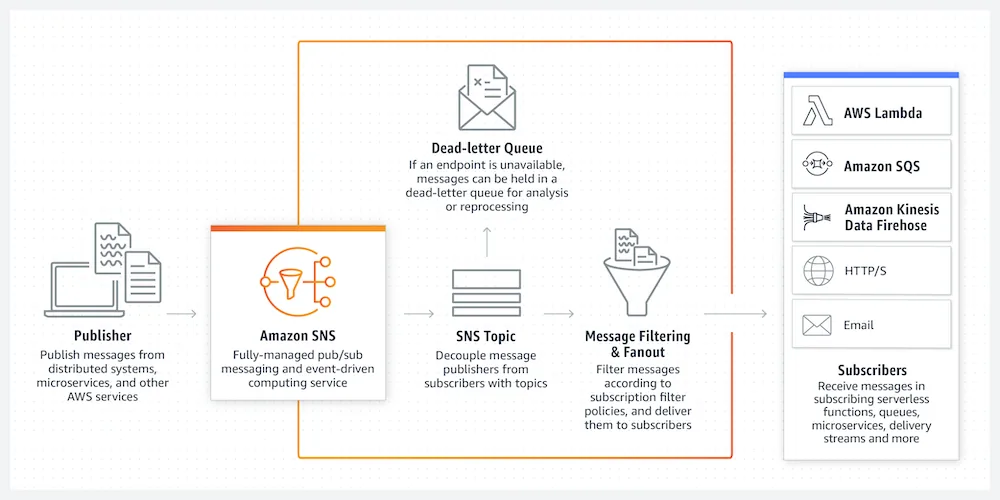
Type of information transfer: communication to applications or people
SNS is a messaging service useful for application-to-application (A2A) and application-to-person (A2P) communication.
One-to-many relationship
This service offers a one-to-many relationship. A message can therefore be sent to several consumers. This behaviour is called fan-out. An SNS topic can have up to 12 500 000 subscribers, offering highly scalable broadcast capabilities.
Using Amazon SNS topics, your publishing systems can send messages to subscriber systems, including Amazon SQS queues, AWS Lambda functions and HTTP/S endpoints, for parallel processing, not forgetting Amazon Kinesis Data Firehose.
Push service
The A2P feature lets you send messages to users at scale via SMS, Mobile Push and email. Unlike SQS, SNS does not retain messages, so if there are no subscribers for a topic, the message is discarded.
How to filter messages published to topics with Amazon Simple Notification Service (SNS) and Amazon Simple Queue Service (SQS) | https://aws.amazon.com/fr/getting-started/hands-on/filter-messages-published-to-topics/
To find out more | https://aws.amazon.com/fr/sns/
When should you use Amazon EventBridge?
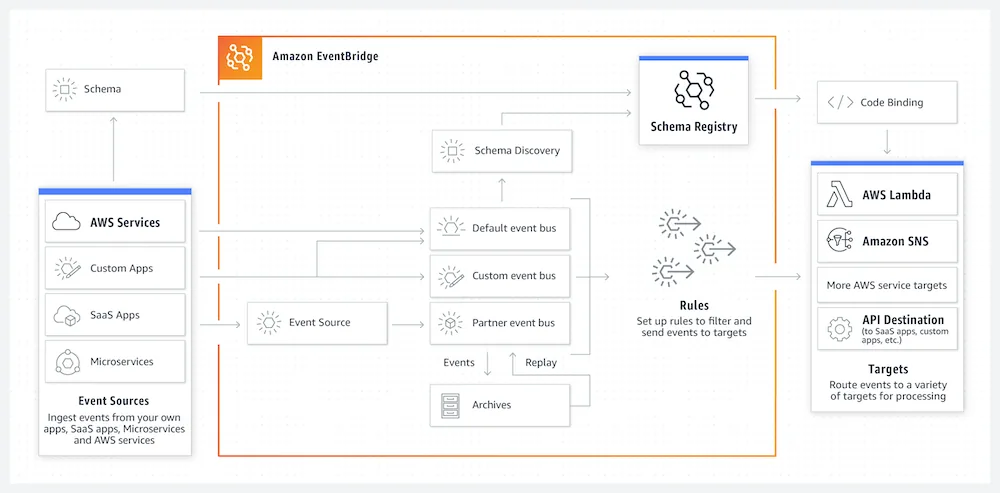
Type of information transfer: event bus
EventBridge connects AWS services, software as a service (SaaS) providers and your own applications using events. An event is a signal indicating that the state of a system has changed, for example the change of state of a customer support ticket. Customers can integrate microservices, SaaS applications and custom applications into their own AWS applications as event sources that publish events to an event bus.
Event-based architectures
EventBridge simplifies the process of building event-based architectures. You can filter and transform incoming messages at the service level and route events to several targets, including Lambda functions.
Writing custom code
EventBridge simplifies the connection of applications. You can add, filter, transform and deliver events without writing custom code. The EventBridge schema registry stores a collection of event schemas that are easy to find and lets you download code bindings for those schemas into your IDE in order to represent the event as a strongly typed object in your code.
How to create an Amazon EventBridge schema
https://docs.aws.amazon.com/eventbridge/latest/userguide/eb-schema-create.html
To find out more | https://aws.amazon.com/fr/eventbridge/
When should you use Amazon Kinesis Data Streams / Firehose?
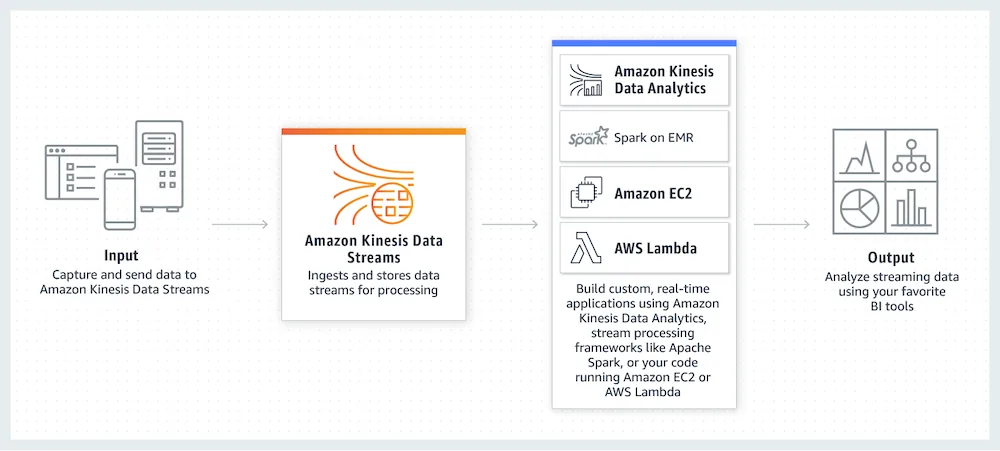
Type of information transfer: data streams
Amazon Kinesis makes it easier to collect, process and analyse streaming data in real time, in order to obtain strategic information quickly and to react quickly. With Amazon Kinesis, you can ingest data in real time, analyse it as it is received and react instantly instead of waiting for all the data to be collected before starting to process it.
2 types of data stream
- Kinesis Data Streams is a real-time data streaming service, able to capture continuously several gigabytes of data per second from hundreds of thousands of sources (website clicks, database event streams, financial transactions, social media feeds, IT logs, location events). The collected data is available within milliseconds to enable the use of real-time analytics such as real-time dashboards, real-time anomaly detection, dynamic pricing
Kinesis Data Firehose is the simplest way to capture, transform and load data streams into AWS data stores for near real-time analytics with existing business intelligence tools. It can capture, transform and deliver streaming data to Amazon S3, Amazon Redshift, Amazon Elasticsearch Service, generic HTTP endpoints and service providers such as Datadog, New Relic, MongoDB and Splunk. It can also batch, compress, transform and encrypt your data streams before loading them, which reduces the storage space used and strengthens security.
To find out more | https://aws.amazon.com/fr/kinesis/
Choosing the right messaging service is not always simple!
In some cases, you will need to combine two of these services or more.
Do not hesitate to consult the AWS documentation for each service.
And if you would like support in setting them up, contact us!