60 years after the first password was created at the Massachusetts Institute of Technology (MIT), the case is clear: passwords are no longer effective enough. To protect users and their personal data on our online solutions, it is worth turning to other alternatives such as passwordless authentication. Let us look together at how to put this new kind of protection in place.
With the massive explosion in cyberattacks – more numerous still since the Covid crisis and the rise of remote working – account security has become a major topic.
All the more so as passwords no longer offer sufficient protection, for many reasons:
- The passwords chosen by users are often far too simple.
- A single password is often used by the same user across several of their accounts.
- Every internet user has far too many online accounts to remember all of their passwords.
- Password management is becoming a real and costly headache for companies.
- Password hacking can have catastrophic consequences for internet users (identity theft, for example).
Faced with this situation, passwordless authentication looks like a good alternative.
Table of contents
What does two-factor, passwordless authentication involve?
This method removes the need to generate a password to access a system. It replaces it with a more secure authentication factor, often in two steps (this is what we call multi-factor authentication – MFA). It may be a code sent by SMS to your phone, or a link sent to your mailbox. These factors make it possible to verify your identity before authorising the connection to a system.
Passwordless authentication works with encryption key pairs made up of a private key and a public key. Even though both are called “keys”, the public key should be thought of as the padlock and the private key as the actual key that unlocks the padlock.
Someone who wants to create a secure account uses a tool to generate a public-private key pair. The private key is stored on the user’s device and is tied to an authentication factor, such as a fingerprint, a PIN code or voice recognition. The user can only access it that way. The private key is supplied to the online web solution for which the user wants to hold an account.
What types of two-factor authentication can we put in place?
- By email: users enter their email address to obtain a link or a one-time code to log in.
- By SMS: users enter their phone number to obtain a code for logging in.
- Biometric: in this case, scanning part of your body (iris or fingerprints, for example) is required to access the solution. Another example, Face ID lets you securely unlock your iPhone or iPad, and authenticate purchases via ApplePay.
These methods have the advantage:
- Of strengthening security
- Of being easier to use – no more memorising “never-ending” passwords.
How to set up two-factor authentication with Amazon Cognito
In this context, we are going to use Amazon Cognito user pools (Pool Users).
A Pool Users is a user directory in Amazon Cognito. Through this pool, your users can sign in to your web or mobile application via Amazon Cognito. Your users can also sign in through social identity providers such as Google, Facebook, Amazon or Apple.
Whether your users sign in directly or through a third party, all members of the user pool have a directory profile that you can access through a software development kit (SDK).
Cognito does not support the passwordless authentication method, but instead lets you manage the authentication process using triggers (lambda functions) and define your own authentication challenge:
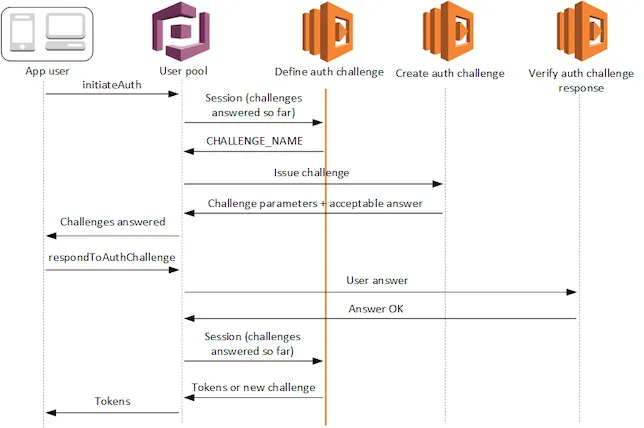
By email
The email authentication solution uses an Amazon Cognito user pool and a few Lambda functions to implement the custom authentication flow. Discover it in this article: https://amzn.to/3h35kBA
Amazon Simple Email Service (Amazon SES) is used to send the emails containing the one-time login codes.
The login process is handled by custom user interface pages.
Here is the architecture of the solution:
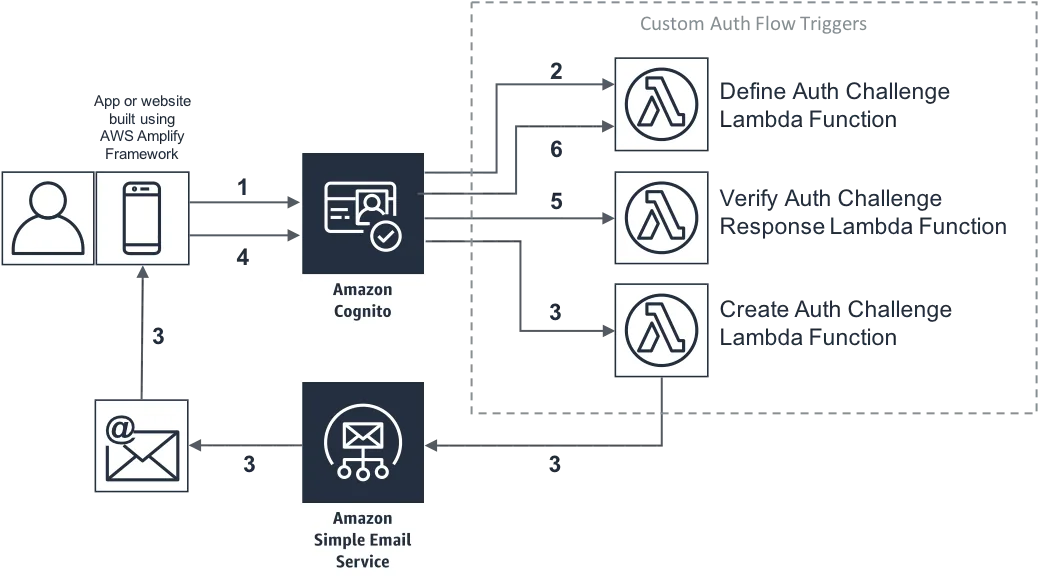
The diagram and the following steps describe how the solution works:
- The user enters their email address on the custom login page, which sends it to the Amazon Cognito user pool.
- The user pool calls the “Define Auth Challenge” Lambda function. This Lambda function determines which custom challenge is to be created.
- The user pool calls the “Create Auth Challenge” Lambda function. This Lambda function generates a secret login code and emails it to the user using Amazon SES.
- The user retrieves the secret login code from their mailbox and enters it on the custom login page, which sends it to the user pool.
- The user pool calls the “Verify Auth Challenge Response” Lambda function. This Lambda function checks the code that the user entered.
- The user pool calls the “Define Auth Challenge” Lambda function. This Lambda function verifies that the challenge has been answered successfully and that no further challenge is needed. It includes “issueTokens: true” in its response to the user pool. The user pool now considers the user to be authenticated and sends the user valid JSON Web Tokens (JWT) (in response no. 4).
If you want to put this authentication method in place, discover the step-by-step method => https://amzn.to/3h35kBA
By SMS
If, on the other hand, you prefer to put an SMS authentication method in place, we invite you to look at this link => https://bit.ly/38HK00j
The authentication method uses the user’s mobile phone to grant permissions to the secured endpoints. This stack was developed using:
- AWS Cognito as the authentication manager.
- Python as the programming language for the lambda functions.
Here is the architecture of the solution:
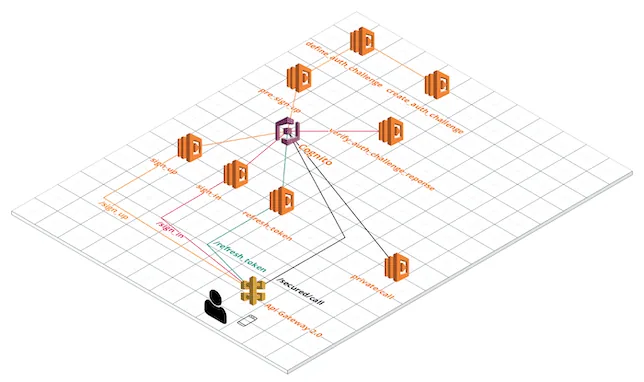
In order to obtain a customisable authentication API, a number of endpoints have been developed:
/sign_up : creates a user in Cognito and sends a single-use password (OTP – one-time password) to the user’s mobile phone. The user has 1 minute to reply.
/sign_in : verifies the OTP that was sent to the user’s mobile phone. The token provided has 1 hour as its expiry period.
/refresh_token : refreshes an expired token.
/secured/call : simply returns all the parameters you sent.
If you want to put this authentication method in place, discover the step-by-step method => https://bit.ly/38HK00j
As there is more and more data to manage, and given the growing number of phishing attacks, this question of MFA is worth asking. For the security of your data and that of your users, and for your company’s peace of mind.
If you would like advice on the subject, do not hesitate to contact us.