
As a company that builds SaaS (“Software as a Service”) solutions on AWS, you almost certainly use AWS Identity and Access Management (IAM) as the backbone of your strategy for isolating your resources and data (“tenants”) for your clients.
IAM lets you define a series of permissions by creating “policies” and attaching them to IAM identities (users, user groups or roles) or to AWS resources. A “policy” is an object in AWS that, when associated with an identity or a resource, defines the permissions of that identity or resource.
AWS evaluates these “policies” when an IAM principal (user or role) sends a request. The permissions determine whether the request is allowed or denied. AWS supports six types of “policies”:
- identity-based,
- resource-based,
- permissions boundaries,
- Organizations service control policies,
- ACLs
- and session policies.
When using this service, many of you create separate “policies” for each client. But very quickly that can produce an explosion, even a “plate of spaghetti”, and make the situation impossible to maintain.
To avoid this situation, the solution is to set up dynamic generation. This method offers a more scalable and more manageable isolation experience. Let us look at how to deploy it.
Table of contents
- RBAC, ABAC, and dynamically generated IAM “policies”: what are the differences between these isolation methods?
- The fundamentals of isolation with IAM
- How do you set up dynamically generated IAM “policies”?
RBAC, ABAC, and dynamically generated IAM “policies”: what are the differences between these isolation methods?
First of all, here is a reminder of the three main isolation methods available with IAM.
- RBAC – User authentication with role-based access control: you assign each client a dedicated IAM role or a group of static IAM roles that it uses to access resources. RBAC works well when you have a small number of Tenants and relatively static “policies”.
- ABAC – Attribute-based access control: this technique suits a set of SaaS applications that are growing fast, unless you frequently have to support role changes or additions. In that case, dynamically generated IAM “policies” are the answer.
- IAM dynamically generated “policies”: this technique dynamically creates an IAM “policy” for a client in line with the user’s identity. Choose this technique in highly dynamic applications with changing or frequently added role definitions (for example, a Tenant collaboration scenario).
The fundamentals of isolation with IAM
Here is how you can isolate Tenants with IAM using the Security Token Service (STS).
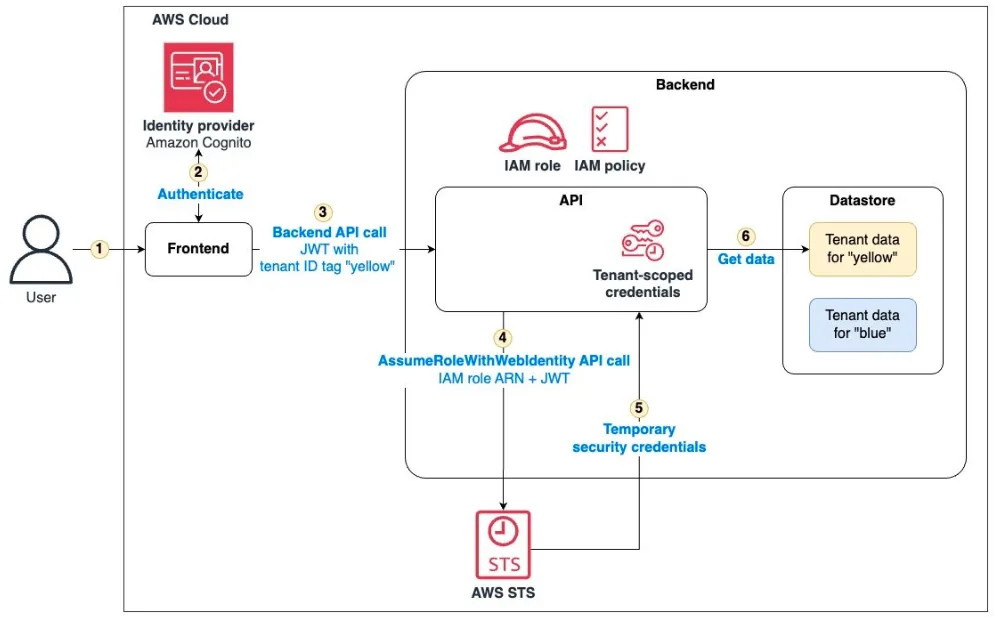
- Incoming requests include an authentication header with a JSON Web Token (JWT) (1) that contains data identifying the current Tenant. This token is signed by an identity provider, guaranteeing that the JWT cannot be modified and that the Tenant’s identity can be trusted.
- We retrieve (2) the Tenant-specific “policy” from IAM and ask STS to return a credential (3) defined in our permissions management.
- When we try to access (4) Amazon DynamoDB, our authorisation (5) to make the getItem SDK call is checked by IAM, allowing or denying access according to the Tenant-specific “policy” we retrieved.
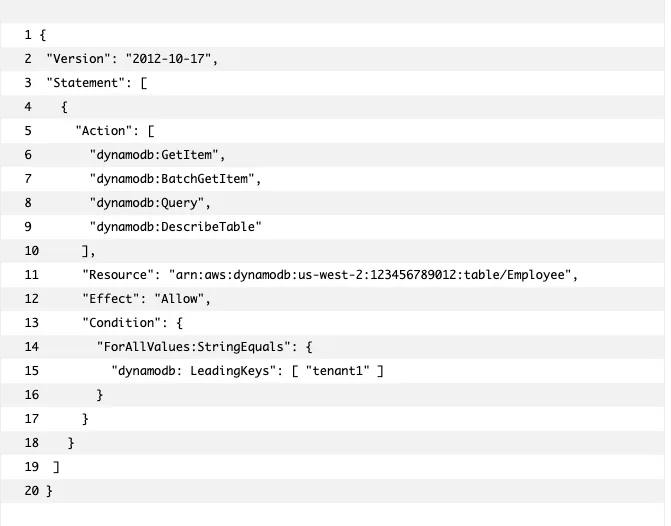
This model is simple and limits access to specific Amazon DynamoDB data for our Tenant. However, this model requires creating a custom permission for each Tenant in the system:
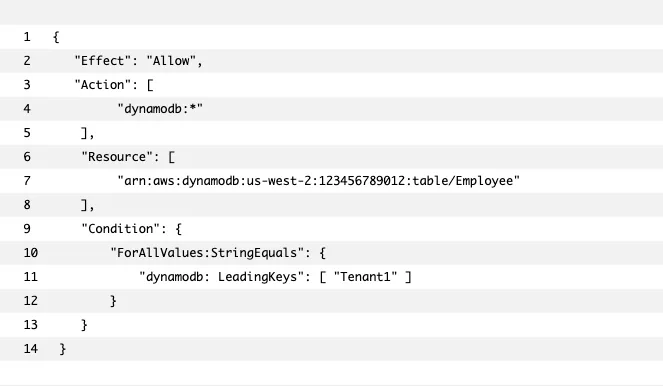
On line 11, we can see that the Tenant identifier is hard-coded in our permission. This raises several problems:
- If the number of Tenants using our system grows very fast, the number of permissions will become unmanageable.
- When you release new features for your service, you will have to modify your existing IAM resources and update the onboarding processes. This will create tight coupling between your services and your security infrastructure, which can increase the complexity of your deployment process.
- It will also limit your team’s ability to focus on building new features. As Tenant isolation and security become harder and harder to maintain and test, you will also increase the chance of introducing an error that could expose Tenant data.
How do you set up dynamically generated IAM “policies”?
Let us go back to the previous example (an attempt to restrict a user’s access to an Amazon DynamoDB resource). This time we do not store our “policy” in IAM. We decide to turn our “policy” into a template in which static Tenant references are replaced by template placeholders.
The table and Tenant placeholders in the following template can now be hydrated with the appropriate values at runtime.
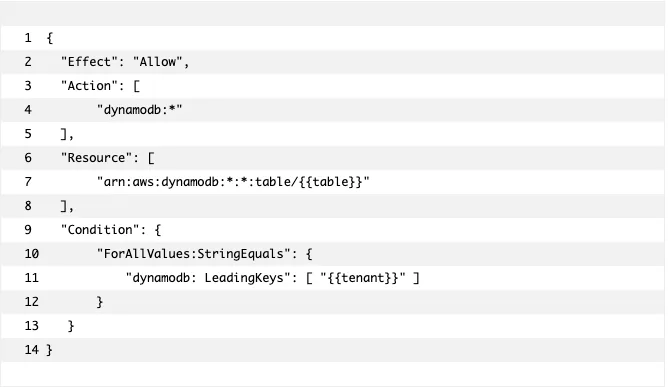
- On line 4, you will notice that the action in this template has a broad scope. This gives us the greatest flexibility to apply this permission to a variety of use cases.
- In this policy, the resources, on line 7, are not Tenant-specific, but note that some “policies” enforce Tenant isolation at resource level.
- The condition operator (on line 9) restricts our Tenant to seeing only the rows with a key that begins with a specific Tenant identifier value (line 11).
Assuming a role
In this example, the role must contain a permission granting access to an Amazon DynamoDB resource. It allows anyone to access DynamoDB resources without any Tenant-specific limitation.
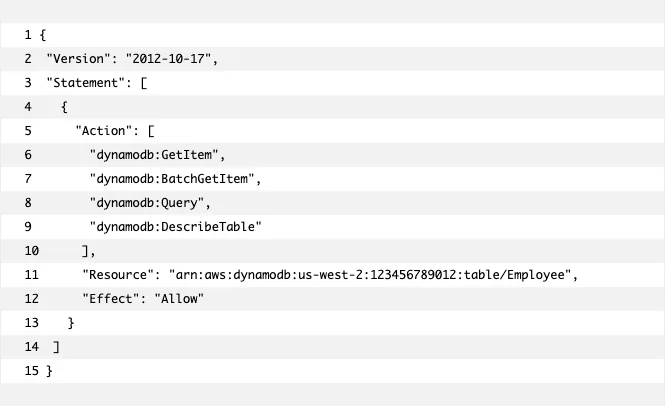
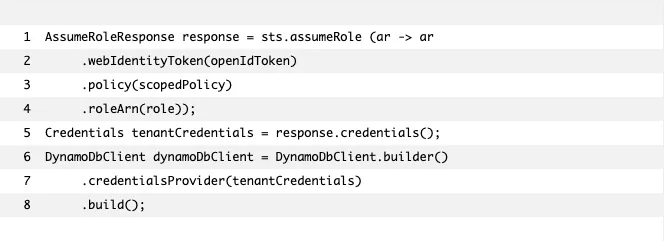
Now look at the permission generated dynamically using the Security Token Service (STS).
From the code point of view, assuming a role with STS is simple. Here is an abridged version of the code that assumes a new role.
Permission templates
The heart of the token vending machine is a set of permission template files. Let us now look at how to manage these template files, allowing them to evolve independently of our code.
Example: how do you create an Amazon S3 permission to restrict access at folder level?
Here is how to access the ListBuckets action (4) for Tenants whose prefix matches the Tenant identifier. This limits a Tenant’s ability to interact with objects in folders belonging to other Tenants.
1 {
2 "Effect": "Allow",
3 "Action": [
4 "s3:ListBucket"
5 ],
6 "Resource": [
7 "arn:aws:s3:::{{bucket}}"
8 ],
9 "Condition": {
10 "StringLike": {
11 "s3:prefix": [
12 "{{tenant}}",
13 "{{tenant}}/",
14 "{{tenant}}/*"
15 ]
16 }
17 }
18 },
19 {
20 "Effect": "Allow",
21 "Action": [
22 "s3:GetObject",
23 "s3:PutObject",
24 "s3:DeleteObject"
25 ],
26 "Resource": [
27 "arn:aws:s3:::{{bucket}}/{{tenant}}/*"
28 ]
29 }
The templates are kept separately from your code, and are deployed and versioned independently.
Since the templates are only JSON files, it may be better to treat them as part of your infrastructure, like a code deployment process. Deploying them on a file system such as Amazon Elastic File System (Amazon EFS) or Amazon S3, both accessible across your whole architecture, would fit well into a microservices architecture.
Generating a permission from templates
Now that our permissions are defined outside IAM, we can introduce code that loads our permission templates into statements and adds them to dynamically scoped “policies” at runtime. Let us look at how we hydrate the permission templates to create permissions.
Here is a simple Java class called PolicyGenerator, responsible for creating a permission:
1 String scopedPolicy = PolicyGenerator.generator()
2 .s3FolderPerTenant(bucket)
3 .dynamoLeadingKey(tableName)
4 .tenant(tenantIdentifier)
5 .generatePolicy();
The aim is to make it as easy as possible for the developer to add correctly formed and valid security permissions. This process requires access to the Tenant identifier that was extracted from the JWT.
Each permission method we add also takes as parameters the required values needed to hydrate that specific template. The token vending machine in our example is configured to add the permissions the microservice needs and to locate the values it needs from environment variables.
Conclusion
Dynamic “policy” generation can help SaaS providers implement Tenant isolation. The example implementation of a token vending machine provides a manageable mechanism for implementing this dynamic generation.
When you implement your own token vending machine, keep a few points in mind:
The permission templates must provide a separation of your isolation permissions, allowing them to evolve independently of your applications.
The “policies” must enable the principle of least privilege, restricting your Tenants’ access to services and data as tightly as possible.
The Tenant identity must be resolved consistently and verifiably within your solution.
Your solution must be encapsulated and reusable across all your SaaS services, returning Tenant-scoped credentials.
For more information on the examples in this article, see the AWS SaaS Factory GitHub repository: https://github.com/aws-samples/aws-saas-factory-dynamic-policy-generation
It contains a sample application and AWS CloudFormation resources to automatically provision the necessary infrastructure in your AWS account.
Contact us