
Amazon DynamoDB is a high-performance NoSQL database devised by Werner Vogel (Amazon’s CTO). It provides data storage for a great many applications. Unlike traditional SQL databases, this service does not use table joins. That forces you to rethink how you record your entities. We then speak of “single table”, or single-table, design.
Data modelling with DynamoDB can be tricky for anyone used to relational databases. Let us look together at what a single-table database architecture is, the steps to follow to build one, its advantages and its drawbacks.
Table of contents
- Definition: what is a single-table database architecture?
- How do you design a single-table database architecture?
- The advantages of single-table design
- Drawbacks of a single-table design
Definition: what is a single-table database architecture?
Single-table design is a data modelling technique used to represent relational data structures in a single NoSQL table.
It is about organising all your data intelligently in one single table (and no longer one table per entity!) and using a primary key, a sort key and indexes to link the entities to one another and access them quickly and efficiently.
How do you design a single-table database architecture?
Planning is essential in this type of design. You need to know what your data is, how it relates to one another and, more importantly, what your access patterns (design pattern) are – they dictate how you must organise your items.
- Here are the steps to follow to create one:
- Create the ERDs (Entity / Relationship Diagram)
- Determine the access patterns (design pattern)
- Define the key structures (leading keys)
- Define the physical indexes (primary key, sort key, GSI/LSI)
- Define the key design strategies
- Define the useful entity relationship strategies
To understand this concept, let us look at some modelling in relational databases, then see together why you have to model differently in DynamoDB.
Let’s discuss your project together!
Background on SQL modelling and joins
With relational databases, you generally normalise your data by creating a table for each entity type in your application. For example, if you are building an application for online sales, you will have a table for customers and a table for orders.

Each order belongs to a given customer and you use foreign keys to reference a record in one table from a record in another. These foreign keys act as pointers – if I need more information about a customer who placed a particular order, I can follow the foreign key reference to retrieve items about that customer.
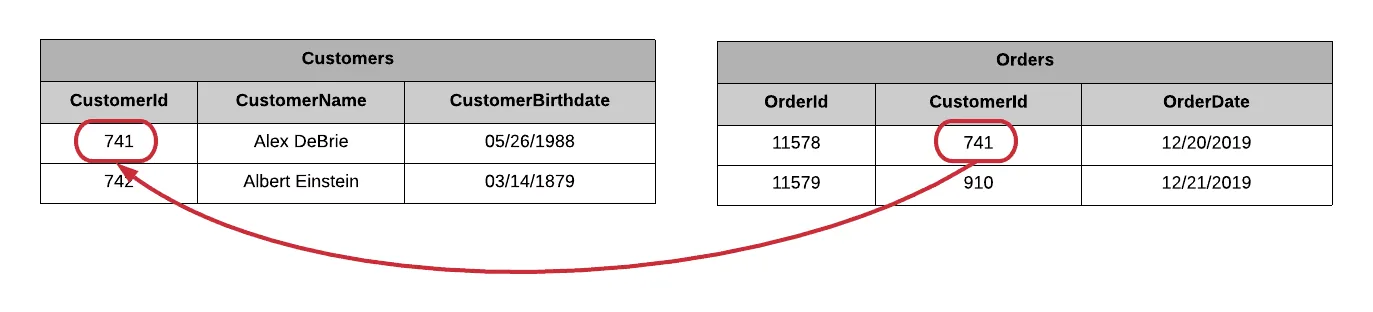
To follow these pointers, SQL, the language used to query relational databases, has a concept of joins. Joins let you combine records from two or more tables at read time.
The problem of missing joins in DynamoDB
Convenient though they are, SQL joins are also expensive. They require:
- scanning large portions of several tables in your relational database,
- comparing different values and returning a result set.
Joins in SQL are limited and hardly scalable. The larger the volume of data, the more performance drops. DynamoDB works around the problem by removing the ability to use them.
In our example below, we want to obtain both a customer record and all of that customer’s orders. In this case, many developers will apply relational design patterns with DynamoDB even though they do not have relational tools such as joins. And since there are no joins, they will have to run several queries to retrieve both the orders and the customer record.
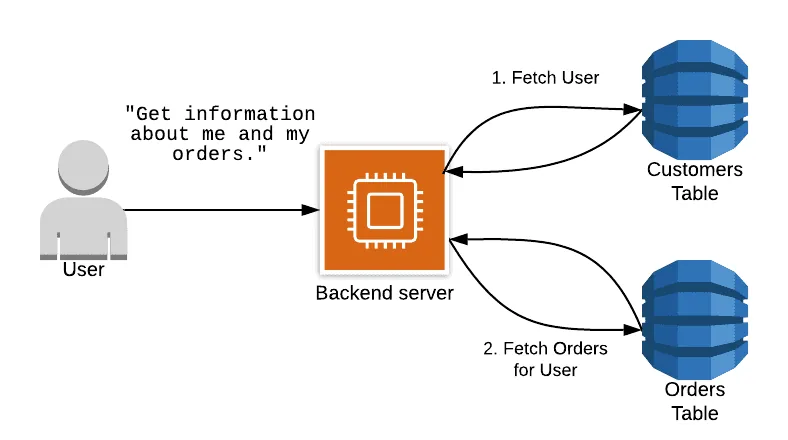
This can cause significant problems in your application, because you will then be running several cascading queries. As your application grows, it could lose performance and become slower and slower.
The solution: group your data into collections using composite keys
So how do you get fast, consistent performance from DynamoDB without making several queries to your database? By grouping your data using item collections.
An item collection in DynamoDB refers to all the items in a table or an index that share a partition key. In the example below, we have a DynamoDB table that contains actors and the films they have appeared in.
The partition key is the actor’s name, and the sort key is the film’s name.
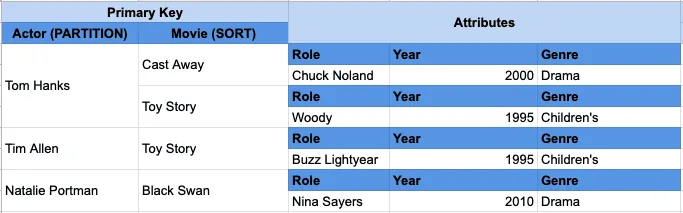
You can see that there are two items for “Tom Hanks” – “Cast Away” and “Toy Story”. As they have the same partition key “Tom Hanks”, they sit in the same item collection.
You can use DynamoDB’s “Query” API to read several items with the same partition key. So if you need to retrieve several heterogeneous items in a single query, you organise those items so that they sit in the same item collection.
In the case of an online sales application, the partition key is the user’s name and the sort key is the order record. For this to be possible in a single query, we make sure that all the order records exist in the same collection as the user record they belong to.
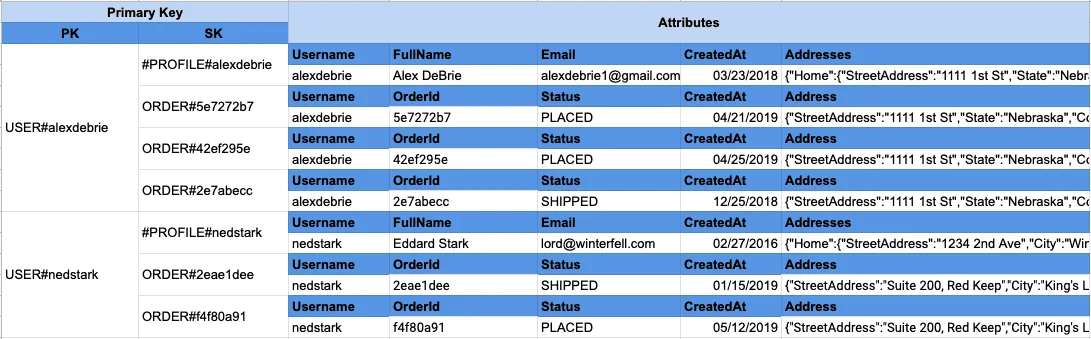
Now, when we want to retrieve the user and the orders, we can do it in a single query without needing an expensive join operation:
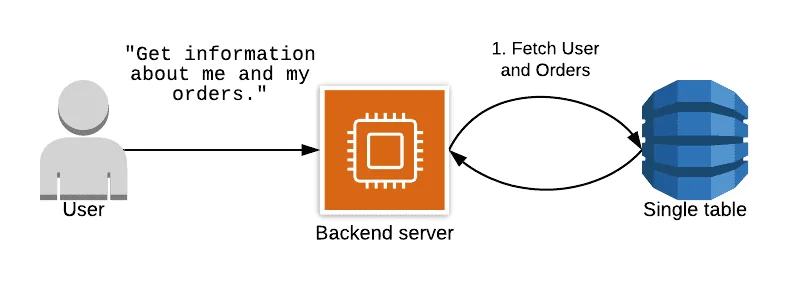
That is the whole point of single-table design: organising your table so that your access patterns can be handled with as few queries to DynamoDB as possible, ideally one.
The advantages of single-table design
This type of single-table architecture lets you:
- access data more quickly, in one or two queries.
- minimise the number of tables you have to manage.
- avoid the operational overheads (monitoring, backup etc …) seen in a classic design comprising several tables.
- make savings: if you have one or two entity types in your single table that are accessed far more frequently than the others, you can hide part of the extra capacity for the less frequently accessed items in the buffer of the other items.
- benefit from the near-infinite scaling that DynamoDB provides.
- improve your solution’s performance by making a single request to retrieve all the items you need.
Drawbacks of a single-table design
There are three drawbacks to single-table design in DynamoDB:
The steep learning curve of single-table design
A single, overloaded DynamoDB table can look really strange at first sight compared with the clean, normalised tables of your relational database. It is hard to unlearn all the lessons you have learned over the years from relational data modelling.
The inflexibility of adding new access patterns (access pattern)
A second difficulty with DynamoDB is fitting new access patterns into a single-table design. When modelling a single-table design in DynamoDB, you start from your access patterns. Think carefully: how will you access your data?
Then model your table carefully to satisfy those access patterns. You organise your items into collections so that each access pattern can be handled with as few queries as possible, ideally a single query.
The difficulty of exporting your tables for analysis
DynamoDB is designed for OLTP use cases — high-speed data access where you work on a few records at a time. But users also need OLAP access patterns – large analytical queries over the whole data set to find popular items, or the number of orders per day, or other information.
DynamoDB is not good at OLAP queries. That is deliberate. DynamoDB focuses on the ultra-performance of OLTP queries and wants you to use other databases purpose-built for OLAP. To do that, you will have to move your data from DynamoDB to another system, for example using DynamodbStream to put the data into S3 (then queried via Athena) or elasticsearch.
If you have a single-table design, it can be hard to put it into the right format for an analytics (OLAP) system.
Conclusion
Single-table database architecture goes hand in hand with DynamoDB. We recommend it if you manage a large volume of data that you need to access very quickly. Beyond ten entities or so, it can be a great help. Below that, be careful: you risk building an over-engineered contraption for very little.
We also recommend putting it in place at the initialisation of the project, on all or part of your application. Example: it is perfectly possible to develop single-table for the basket part of an e-commerce site, and to use relational databases for everything else.
Hence the importance of planning the design of this kind of database architecture properly before embarking on it.
By following all this information, you can now create your single-table database on DynamoDB. Once you have modelled your table, you will put it into action and write the code to implement it. Your application will then be able to scale indefinitely without performance degradation.
If you would like advice and support on this subject, do not hesitate to contact the Premaccess team. As AWS experts, they will support you step by step in delivering this project.
Contact us
Sources used in writing this article: